Posts

Showing posts with the label Tips

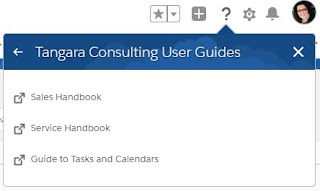
Customising the Help Menu!
Image
Who knew?  I have to confess that I was late to this party and did not know this was an option until this month (May 2020). So if I have been tragically unaware of this feature, then maybe you were too. Consider this post an attempt to rectify that. Why Customise Your Help Menu? Why should we care? Why is this worth reading about I hear you ask, and I will answer. In my experience the number of users each Salesforce Admin or Helpdesk Exec has to support does not leave them with the capacity to quickly respond to every user's questions. There is often a backlog, and cloning machines do not yet exist. We also know that users getting stuck and feeling frustrated can kill adoption, which is the enemy of a successful Salesforce implementation. Now I know that every good Salesforce Admin has spent a lot of time and care creating detailed user guides for their colleagues, but how many of these users remember where the guide is saved at their time of need? Not many..... which is why it is ...

Give Your Users A Helping Hand With In-App Guidance

Image
I recently presented at the inaugural Virtual Dreamin' , and my session was entitled Give Your Users a Helping Hand with In-App Guidance . My session talks about the Prompts In-App Guidance functionality and not the Walkthrough feature as this is a paid add-on and requires a MyTrailhead subscription. I prefer to highlight the items to which we all have access, rather than the chargeable extras. In this presentation I talk through seven different use cases as well as demonstrate exactly how easy they are for every admin to create, deploy, and monitor. In-App Guidance is a gift to your user and to yourself. Provide step by step prompts, leave recommendations and tips, as well as documentation, all for your users right from within the Salesforce UI. Give them the answers before they realise they need them, and cut down on those support tickets. In this session we’ll go through some of the best use cases for In-App Guidance, leaving you empowered and inspired to build them out in your...

5 Quick Dreamforce Tips

Image
I've posted my Dreamforce advice in the past - How to Have an Awesome Dreamforce - but now I have collated some new quick tips. Here are a few things I try and remember - Prep for Trailhead In order to get the special Dreamforce Trailhead badge you usually need to complete a module while on the official WiFi. In order to save yourself time, before you leave home prepare a module by completing all except for the final unit, and then once you are at DF and connected, complete the final unit and 'Ta Da', you will get your special badge. The App is Key The Salesforce Events App is essential for DF. If you have watched any of the Road to Dreamforce sessions you will know that nearly every logistical question was answered with "see the app". Where to get lunch, what time and where you can collect your badge, and where to find the gender neutral bathrooms are all there. Most useful, IMO, though, is the at a glance agenda and the reminders it provides. DF is fra...

It's fun (and essential) to play in the sandbox

Image
I sat for, and passed, the Development Lifecycle and Deployment Designer certification earlier this month and it really was a reminder of the importance of sandboxes for all Salesforce admins and developers. This exam, being part of the architect track, is pitched at a more technical level than that of your average admin, but proper use of sandboxes does not require this kind of experience and is definitely not just for developers. Last year I wrote a series of posts entitled Best Practices and Recommendations for New Admins and one of the Tools from post four was Sandboxes . Here is a deeper dive into the world of Salesforce Sandboxes. I was shocked recently to hear a tale of an end customer having no sandboxes in use at all. There really is no excuse, sandboxes are available to all customers. How many, and what type, depends on your edition. Here is a handy grid to tell you how many you have access to out of the box. You can, of course, buy more. Why make it complicated...

Best Practices and Recommendations for New Salesforce Admins (Part Four - Tools)

Image
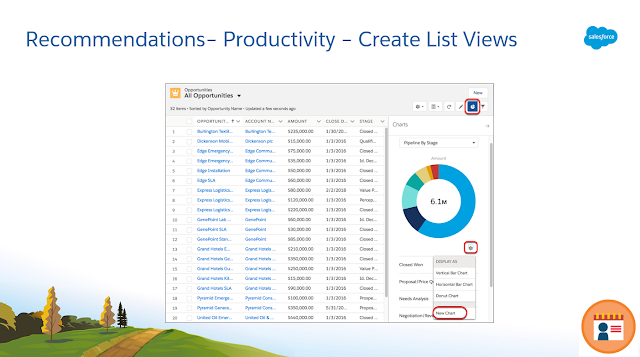
They say hindsight is a wonderful thing and they are right, we can't go back and do over, but we can share what we have learnt and allow others to benefit from our experiences. This was my approach to the session I presented at the Admin Theatre at this year's London World Tour. My talk was entitled  Best Practices and Recommendations for New Salesforce Admins . The role of Salesforce Admin brings with it a lot of responsibility, but thankfully also all the tools and support to enable each of us to be successful. When we start our Salesforce journey, however, we don't come with all this knowledge fully formed so here are my recommendations and tools to help everyone make the most of the available features. For ease I am splitting my tips up into Best Practices, Recommendations, and Tools, and then into Setup, Reporting, and Productivity. Part one  here  covers Setup Best Practices. Part two  here  covers Reporting Recommendations. Part three here cov...

Best Practices and Recommendations for New Salesforce Admins (Part Three - Productivity Recommendations)

Image
They say hindsight is a wonderful thing and they are right, we can't go back and do over, but we can share what we have learnt and allow others to benefit from our experiences. This was my approach to the session I presented at the Admin Theatre at this year's London World Tour. My talk was entitled Best Practices and Recommendations for New Salesforce Admins . The role of Salesforce Admin brings with it a lot of responsibility, but thankfully also all the tools and support to enable each of us to be successful. When we start our Salesforce journey, however, we don't come with all this knowledge fully formed so here are my recommendations and tools to help everyone make the most of the available features. For ease I am splitting my tips up into Best Practices, Recommendations, and Tools, and then into Setup, Reporting, and Productivity. Part one  here  covers Setup Best Practices. Part two  here  covers Reporting Recommendations. Part four here covers To...

Best Practices and Recommendations for New Salesforce Admins (Part Two - Reporting Recommendations)

Image
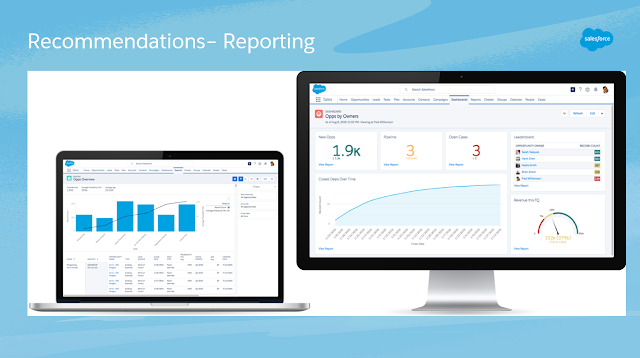
They say hindsight is a wonderful thing and they are right, we can't go back and do over, but we can share what we have learnt and allow others to benefit from our experiences. This was my approach to the session I presented at the Admin Theatre at this year's London World Tour. My talk was entitled Best Practices and Recommendations for New Salesforce Admins. The role of Salesforce Admin brings with it a lot of responsibility, but thankfully also all the tools and support to enable each of us to be successful. When we start our Salesforce journey, however, we don't come with all this knowledge fully formed so here are my recommendations and tools to help everyone make the most of the available (#Safe Harbor) features. For ease I am splitting my tips up into Best Practices, Recommendations, and Tools, and then into Setup, Reporting, and Productivity. Part one here covers Setup Best Practices.    This post (part two) covers Reporting Recommendations. The Sal...

Best Practices and Recommendations for New Salesforce Admins (Part One - Setup Best Practices)

Image
They say hindsight is a wonderful thing and they are right, we can't go back and do over, but we can share what we have learnt and allow others to benefit from our experiences. This was my approach to the session I presented at the Admin Theatre at this year's London World Tour. My talk was entitled Best Practices and Recommendations for New Salesforce Admins. The role of Salesforce Admin brings with it a lot of responsibility, but thankfully also all the tools and support to enable each of us to be successful. When we start our Salesforce journey, however, we don't come with all this knowledge fully formed so here are my recommendations and tools to help everyone make the most of the available (#Safe Harbor) features. For ease I am splitting my tips up into Best Practices, Recommendations, and Tools, and then into Setup, Reporting, and Productivity. This post (part one) covers Setup Best Practices. Number one in my list of setup best practices rela...

My Advice To This Year's 1st Time Speakers

Image
Last year, at my 2nd Dreamforce, I presented two sessions on the Admin Track, one solo on the Admin Theater, and one two-handed Breakout session. At this point I had already spoken at many different Salesforce user groups and community events, nevertheless Dreamforce was (is) a daunting proposition. The admin track session owners do a great job of looking after all speakers, newbies and veterans alike, but when it comes to the time of your session, the solo presenters amongst us have only ourselves to rely upon. If you are like me then the minutes before you step on stage, but can see the waiting audience, you will wonder why on earth you ever thought this was a good idea. Yet, the moment you walk off the stage you will be wondering how soon you can do it again! Next month's Dreamforce will again see a large number of 1st time speakers who are probably starting to feel the nerves set in right about now. Here is my advice to them all: DO Familiarise yourself with your sur...

How to Stay on Track When the Gremlins Attack

Image
"What's the worst that can happen?" Before I stepped onto the stage for the first time I know this was said to me, I also know that I have said it to others experiencing those, oh so common, last minute jitters. I hate to bring this out into the open but the thing is....it won't always go smoothly, there will be glitches and though we may want to tell ourselves, and others, that it'll be fine, nothing will go wrong, this can be a white lie. So let's talk about this reality and how we should, as the saying goes, " hope for the best but be prepared for the worst ". Admittedly not the worst but I have faced a few challenges over the last few years. I can't trump Brad who notoriously fell off the Dreamforce stage and had to be taken to hospital (he thankfully made a full recovery) but here is what I have faced: It started off gently at Surf Force , mid-flow I was made aware that my dulcet tones weren't reaching the back of the room a...

Why Training is Key to Adoption

Image
In a previous blog ' Train Your Way to Awesome Adoption ' I provided tips and guidance to help my fellow admins plan and manage their training sessions. In this post I want to take a moment to talk about why it is important to provide hands-on training to your users before letting them loose on the system. Why is Training Important?  Why does good training = Awesome Adoption? It may seem like a given, that is should be obvious to us all, but I am so often asked to give a new employee access to the system without any training, and I am sure I am not alone in this. I am regularly assured that new recruits will be trained ‘on the job’ or worse – that it is fine, they have already logged in using a colleague’s password.....! The extra effort of asserting that training is required before issuing the licence, and finding the time to carry it out, will pay off in the long run. Confidence Breeds Success It is simply human nature that the better trained a user is will ha...

Train Your Way to Awesome Adoption

Image
Well trained users are every admin's key to awesome adoption.   Fact. It is a subject close to my heart and one on which I have now delivered several presentations. Each time I have given a talk on training I have been overwhelmed by positive feedback and questions which followed and so I know that it is an area of concern for admins and consultants alike. Here are my recommendations to help you to plan and deliver a successful training session: How to plan a successful training session?  Start by capturing the answers to the following questions: Who are you training? Make sure you know who you will be training, the business or division they work for, and their roles. You will need this to settle on the answers to: How will you group your trainees? How many sessions will be required? Numbers will play a part in these decisions, if you are training two new starters then you don't need ten sessions but choose the size of your sessions and who you group together ...